
Apple CarPlay Retrofit Kit for Toyota Camry 2012 with Installation Guide and US Support
by Echo Zou on Nov 25, 2025

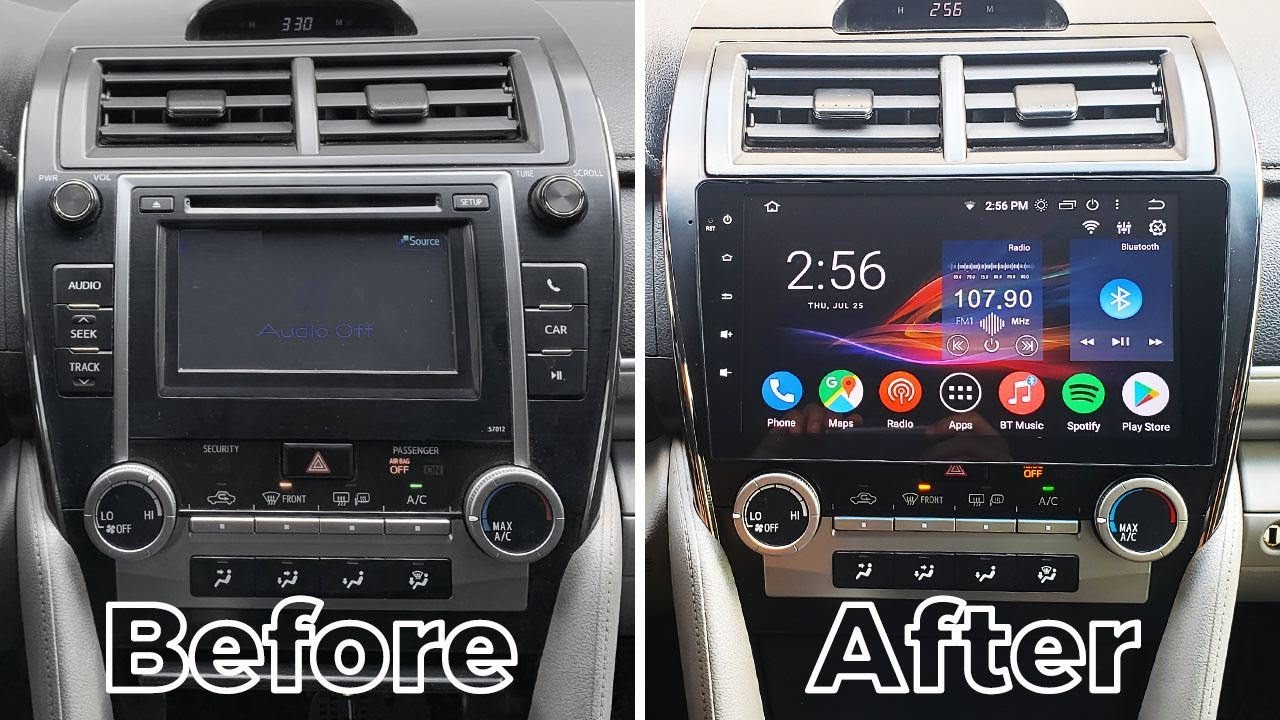
Toyota Camry 2012 CarPlay retrofit refers to upgrading a 2012 Camry with Apple CarPlay, either by changing out the head unit or integrating a CarPlay module. Many L.A. Drivers install plug-and-play kits that retain factory steering wheel controls, backup camera, and JBL audio. There are wired and wireless options, both with mic placement near the gauge hood for clear calls. Installation time takes approximately two to three hours. Below, see parts, fit notes for LE, SE, XLE trims and step-by-step tips.
Why Upgrade Your Camry?
Why trade in a car that runs great just to get Apple CarPlay in a 2012 Camry, giving you all the features most drivers expect on their daily LA commute or freeway blast?
Unlock access to Apple CarPlay, enabling seamless integration of your iPhone and favorite apps directly on your Camry’s screen.
CarPlay mirrors key iPhone apps on the head unit, so you have phone, messages, maps, podcasts, and music all in one place. Plug in USB or use a wireless module if the kit supports it. Favorites are Apple Music, Spotify, Audible, and Waze. Third-party calling apps and calendar alerts display big, clean touch targets. Updates arrive via your iPhone, so features can remain fresh without trading in hardware.
Enhance your driving experience with hands-free phone calls, navigation via Apple Maps or Google Maps, and voice commands using Siri.
Hands-free calls pipe through the car’s speakers with sharp mic input, reducing wind and road noise on the 405 or Sepulveda. Maps allow you to pick Apple Maps for lane guidance and live incidents or Google Maps for powerful search and traffic throughout LA neighborhoods. Say “Hey Siri” to begin an LAX route, text a friend, play a playlist or find cheap gas near Glendale, all hands-free.
Modernize your 2012 Camry with advanced connectivity features found in new vehicles, including wireless CarPlay support and digital car keys.
Some retrofit kits include wireless CarPlay, meaning your phone stays in your pocket or MagSafe mount. A few modules enable digital key functions through companion apps or NFC accessories, allowing you to lock, unlock or start with your phone on supported configurations. Fast boot times, over-the-air firmware and backup camera inputs help the cabin feel closer to a 2023 trim minus the new-car sticker price.
Increase convenience and safety by reducing driver distraction through a simplified interface and steering wheel controls for music, messages, and navigation.
The CarPlay UI employs big icons, bold labels, and intuitive menus. Steering wheel buttons keep volume, track skip, and call controls at your thumbs. Night mode dims maps for canyon drives. Do Not Disturb while driving silences pings. Less tapping, less glare, more road.

Choosing Your CarPlay Kit
Concentrate on fitment for the 2012 Toyota Camry in the U.S. Verify the kit retains factory features such as steering wheel buttons, factory mic (if compatible), and the OEM or add-on camera inputs.
Wired vs. Wireless
Your CarPlay Kit Wired is connected with your Lightning cable for the most stable connection and least latency. It’s easy, less expensive, and perfect if you endure long-hour L.A. Commutes and just want reliable maps and calls.
Wireless gives you auto-join and a clean cabin with no cable. It can drop if your phone bounces between Wi-Fi networks or if the module has feeble 5 GHz radios. Check iOS version notes, chipset, and if the kit supports dual-Bluetooth pairing. Other wireless kits require additional antennas, firmware updates, or a concealed USB power feed behind the dash.
Screen Integration
|
Feature |
2012 Camry Fit |
Why It Matters |
|---|---|---|
|
720p/1080p output |
Yes (most kits) |
Crisp Maps and Music UI |
|
Capacitive touch |
Varies by kit |
Smooth pinch/scroll |
|
Split view/widgets |
Kit-dependent |
Faster app swaps |
|
Day/night dimming |
Via CAN or manual |
Safer glare control |
Go with HD output and capacitive touch if you replace the screen. If you stick with the stock display, just make sure it supports LVDS harness and that CarPlay fills the screen without weird borders.
Feature Retention
Maintain steering wheel controls for track skip, volume, and voice. Ensure reverse camera triggers quickly with parking guide lines. Let climate displays be on the factory screen; don’t buy kits that overwrite HVAC pop-ups. Search for OEM-type plugs, LVDS-labeled, and CANBUS packing containers that go vehicle info. Keep factory menus and park sensors and test before final reassemble.

The 2012 Camry CarPlay Retrofit Process
2012 Camry CarPlay Retrofit Process … effectively replacing the factory head unit with a CarPlay-capable system while preserving key functions. Expect cramped quarters behind the dash and proprietary Toyota connectors, and reserve 3 to 5 hours. Steps: 1) Gather tools and kit; 2) Disconnect battery; 3) Remove dash trim; 4) Uninstall factory radio; 5) Connect new harness; 6) Install the new unit; 7) Test all functions.
1. Gather Your Tools
Get panel pullers, Phillips and flat screwdrivers, wire strippers, crimpers, heat-shrink or electrical tape, and zip ties. A multimeter assists in verifying power and ground.
Lay out the CarPlay kit: head unit or screen, main harness, antenna adapter, steering wheel control (SWC) module, USB retention or replacement cable, and camera adapter if your Camry has the OEM camera. Verify the faceplate is a 2012 trim.
Have the Toyota-specific wiring diagram or your unit’s install guide open. Mark ACC, 12V constant, ground, illumination, SWC, and speaker pairs.
Employ a clean bench or cart to stage screws and clips in cups or bags.
2. Disconnect the Battery
Loosen and remove the negative terminal with a 10 mm wrench. Wait three to five minutes for airbag and body modules to sleep.
Verify no dome or dash lights are on. Separate the cable so it cannot contact metal.
3. Remove Dash Trim
Work plastic tools around the radio bezel and side trims to prevent scuffs. Remove hidden screws around the HVAC stack.
Sort bag clips and screws by location. Snap pictures as you take each piece off for speedy reassembly.
Be careful of the hazard switch harness. Unclip it prior to yanking the panel clear.
4. Uninstall Factory Radio
Back out the four radio bolts, slide it forward, and unplug the main harness and antenna. Label each plug.
Inspect the cavity for foam blocks or loose clips. Box up the OEM radio.
5. Connect New Harness
Click Toyota-to-aftermarket harnesses, color-to-function, not just color-to-color. Install SWC and camera adapters if required.
Fasten with zip ties and tape joints to avoid buzz. Cross-check each lead with the manual before power.
6. Install the New Unit
Mount brackets, slide unit in, and tighten screws without forcing. Add a wireless dongle or HDMI if your unit requires it.
Reconnect the battery and test the boot, audio, mic input, and camera. Make sure the face sits flush and vents aren’t obstructed.
7. Test All Functions
Launch CarPlay and test touch, volume, fader/balance. Pair Bluetooth or plug in a Lightning cable. Confirm Siri and Maps guidance over speakers.
Test SWC buttons, backup camera lines, dimmer. Got a call, streamed music and drove a block or so to ensure GPS lock and noise-free audio.
.jpg)
Professional Installation Insights
Professional installers know the 2012 Camry’s wiring, dash layout, and steering-wheel control logic, which helps avoid noise, glitches, or warning lights. They utilize vehicle-specific harnesses so no factory wires are cut, making the install reversible and compliant with safety standards. This comes into play if you intend to sell the car or want to retain any existing warranty.
Consider hiring a certified installer for complex retrofits or if you lack technical expertise.
The Camry’s dash contains concealed clips and brittle trim that snaps if pried improperly. A pro shop takes care of dash removal, tucks mic and USB wiring cleanly, and installs CAN bus adapters so volume, phone, and voice buttons remain functional. Most jobs are 2 to 4 hours depending on options such as backup cameras or factory JBL. Labor ranges from $200 to $1,000. Combined with a good head unit, the grand total usually ends up somewhere in the $600 to $1,500 range. Premium builds with high-end units, camera upgrades, and custom work will top $2,000.
Ask about warranty coverage and post-installation support for both parts and labor.
Good LA shops will often include one to two years of labor coverage. Find out what is covered if CarPlay loses connection, the mic buzzes, or the display flickers. Inquire about firmware updates, a map of the wiring utilized, and a service window for dialing in following a week of driving.
Request a demonstration of all CarPlay features and retained vehicle functions before leaving the shop.
Have the installer demonstrate wired and wireless CarPlay, phone calls, Siri, messages, and map audio ducking. Backup camera lines, dimmer, steering buttons, and factory USB or AUX retention are tested. For JBL systems, check balanced sound and fader control. Confirm mic positioning and road noise pickup on a brief call.
Compare installation quotes and timelines from reputable service providers in your area.
Obtain 2-3 quotes from reputable LA dealers and installers on wheels. Request itemized parts such as harnesses, dash kit, and antenna adapter, along with labor hours, finish time target, and add-ons. Choose the shop that offers integration expertise, not just the lowest bid.

The Long-Term Ownership Reality
Retrofit CarPlay in a 2012 Camry can make every day a little easier and give new life to an aging cabin. Anticipate sleeker maps, more secure calls, and improved audio control. Prepare for maintenance, monitor receipts, and understand it won’t completely sync with factory systems in recent Toyotas.
Software Updates
-
Check the kit maker’s site or app for firmware notes, and read changelogs before you update.
-
Update iOS after checking forums for CarPlay bugs. Postpone if major problems are reported.
-
Put your iPhone on a backup and then put CarPlay in park to the test.
-
Use a clean USB stick (FAT32) or the unit’s SD card for firmware loads. The long-term ownership reality.
-
In an off-hours update, say Sunday evening, with the engine on to maintain a stable voltage.
-
After updates, re-pair Bluetooth/Wi-Fi and reset CarPlay settings if you experience lag or crashes.
Resale Value
A neat, fully recorded retrofit can assist in Los Angeles, where purchasers anticipate smartphone integration for visitors, podcasts, and rides across the basin. ‘Apple CarPlay added’ listings receive more clicks than stock 2012 audio units.
Save the original radio and trim in a box marked. Others desire OEM aesthetics or intend to transplant the CarPlay puck into a different vehicle.
Provide receipts for the head unit, wiring harness, dash kit and any Maestro or steering-wheel control module. If a professional installed it, add the shop invoice and pictures of the wiring and fuse taps.
Check off pristine fitment, steering-wheel control integration, backup camera integration, and USB routing. There’s the long term ownership reality that a smooth setup increases the value in your eyes, even if the price guide doesn’t reflect a dollar for dollar return.
Warranty Concerns
Most 2012 Camrys are out of factory coverage, though confirm any extended service plan terms. A few lack electric accessories.
Choose kits and workshops that provide a minimum one-year warranty on components and workmanship. Question how they support firmware and warranty returns.
Bad wiring, unfused power or bad grounds can cause faults. The real long-term ownership reality is to “Use your harnesses and steer clear of wire cuts when you can.
Save every receipt and install photos. Neat records expedite claims and minimize the likelihood of disputes.
Is This Upgrade Worth It?
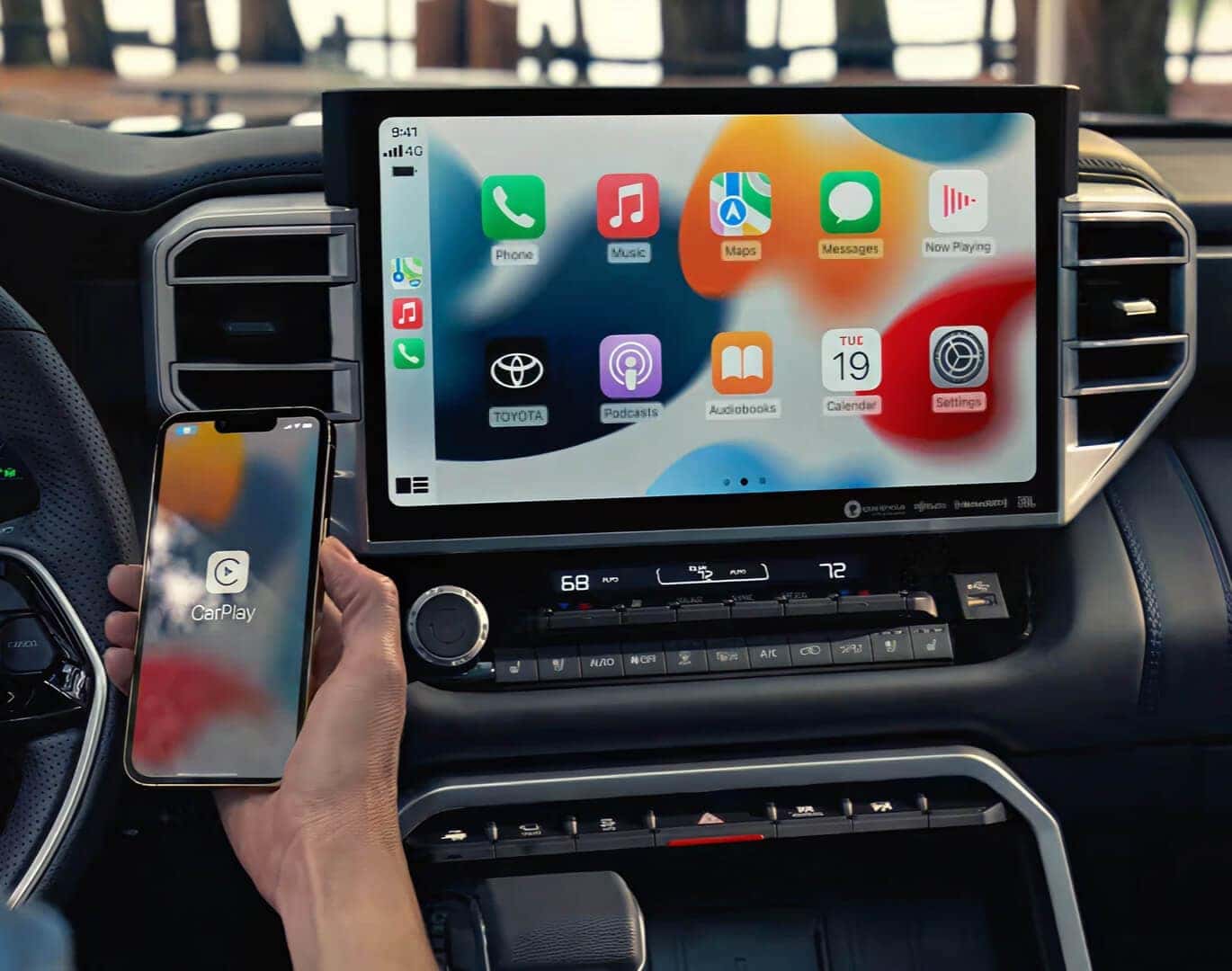
A CarPlay retrofit returns a 2012 Camry the same foundational features that newer cars have without having to buy new. It’s a value decision, a fit decision, and a how do you drive in the U.S. Decision.
Weigh the benefits of modern smartphone connectivity, navigation, and entertainment against the cost and installation effort.
CarPlay puts Apple Maps, Google Maps, Waze, Apple Music, Spotify, Podcasts, and texts on a slick screen with Siri. You get instant reroutes, clear lane advice, and convenient search for fuel, food, or parking. Most retrofit kits cost roughly $250 to $700, plus $100 to $300 for components like a dash harness or steering wheel control adapter, and $150 to $400 for professional installation. DIY is doable with trim tools and patience, but schedule 2 to 4 hours and keep a 10 mm socket and panel tool handy. Believe me, you will want a mic run to the A‑pillar and a USB lead to the center console.
Consider the long-term convenience of using Apple CarPlay apps, hands-free controls, and wireless connections.
Siri takes care of calls, texts, and music, leaving your eyes where they belong: on the road. If you select a unit with wireless CarPlay, your iPhone pairs as soon as you fire up the car, no wires needed. Wired has less dropouts and charges your phone. Wireless is clean and rapid for quick jaunts. Over-the-air firmware updates add features and fix bugs. Map data stays fresh with no SD cards to purchase.
Factor in the improvement to your daily driving experience and potential boost in resale value.
Daily wins arrive in commute traffic with live alerts, weekend getaways with crisp voice directions and school runs with one-tap playlists. Sound generally sounds better with nicer DACs and time alignment. A neat, name-brand unit with OEM-style trim can boost buyer interest and save days on market, although resale premium differs by area and purchaser.
Decide if the upgrade aligns with your needs, budget, and desire for enhanced technology in your 2012 Camry.
If you use iPhone apps daily, drive in congested zones, and desire safer, easier-to-use controls, the cost is justified. Budget, wired versus wireless, trim fit for your Camry LE/SE/XLE, pro install for that factory look.

Conclusion
In other words, a 2012 Camry with CarPlay feels new, secure, and comfortable to survive in LA gridlock. Calls stay clean. Maps keep you on point on the 405. Music and podcasts load quickly. You keep the car you love and reduce the daily hassle.
There’s nothing cooler than a solid kit that runs clean with the stock look. Wired provides the most reliable connection. Wireless is slick once you’ve got it installed. A pro in LA can swap the head unit, route the mic near the gauge hood, and retain steering wheel buttons. Anticipate a half day at a shop around Van Nuys or Torrance.
Need next steps? Put down your trim level and aspirations. I can share kit picks, shop refs in your area and an easy install plan.
Frequently Asked Questions
Will CarPlay work with my 2012 Toyota Camry’s factory screen?
Yes, with the right retrofit kit or replacement head unit. Most kits maintain the stock screen and controls. Others drop in a CarPlay unit in place of the radio. Verify trim level, JBL or non-JBL audio, and backup camera integration prior to purchase.
Do I need to replace the factory microphone and USB port?
Frequently, indeed. All of these aftermarket units come equipped with a mic for clearer calls and voice commands. Most installs, meanwhile, tack on a new USB port for data and quick charge. Certain kits can repurpose the factory USB, but dependability is hit or miss.
How long does the retrofit install take?
DIY installs require 2 to 4 hours if you’re handy. A Los Angeles shop usually takes 1 to 2 hours. Times depend on JBL wiring, backup camera retention, and steering wheel control setup.
Will I lose steering wheel controls or the backup camera?
No, if you have the right harness and interface. Go with a kit that supports SWC and camera retention. Trusted LA installers understand which adapters retain factory features.
Is wireless CarPlay reliable in a 2012 Camry?
For the most part, yes with good kits. Fast pairing and rock solid audio. Wireless can drain your phone’s battery quickly. For road trips, plug in by USB to charge and minimize lag.
How much does a CarPlay retrofit cost in Los Angeles?
Parts go from $250 to $900. Professional installation generally adds $150 to $350. JBL systems and custom cam work can increase the price. Compare quotes from local installers in the Valley, Westside, and OC.
Will CarPlay affect my Camry’s resale value?
Typically good. SoCal buyers demand modern connect-ability. A nice, reversible install with a reputable brand head unit can make your listing pop without damaging uniqueness.


